


Managing the financials of a Homeowners Association (HOA) can be daunting. With various expenses, dues, and regulations, maintaining accurate records is crucial. Fortunately, QuickBooks Online offers a robust solution tailored to these needs. This blog post will guide you through efficiently using QuickBooks Online for Homeowners Associations, ensuring your HOA’s finances are in perfect order.
Understanding HOA Financial Needs
Homeowners Associations have financial structures that differ significantly from traditional small businesses. Rather than focusing on profit generation, HOAs are responsible for collecting member dues, paying shared expenses, and maintaining common assets on behalf of the owners. This makes clarity, transparency, and consistency in financial reporting especially critical.
Most HOAs manage recurring income from monthly or quarterly dues, along with shared operating expenses such as insurance, utilities, landscaping, maintenance, and professional services. In addition, associations must plan for long-term repairs and capital projects through reserve funding, which requires disciplined budgeting and accurate tracking. These responsibilities demand an accounting system that can clearly allocate income and expenses, support board oversight, and produce understandable financial reports for owners.
Benefits of Using QuickBooks Online for HOAs
QuickBooks Online works well for HOAs because it supports structure, consistency, and transparency—three things associations need most. Rather than treating the HOA like a typical small business, QuickBooks Online allows income and expenses to be organized in a way that aligns with units, ownership percentages, and board reporting requirements.
With the right setup, QuickBooks Online makes it easier to record recurring dues, track shared operating expenses, and reconcile bank activity accurately. Automated bank feeds and reconciliation tools reduce manual entry and help ensure the financials tie out to actual cash activity, which is critical for board confidence and year-end reporting.
Because QuickBooks Online is cloud-based, authorized board members, treasurers, and accounting professionals can securely access the same real-time data from anywhere. This shared visibility supports better oversight, smoother transitions between board members, and clearer communication with owners—without relying on spreadsheets or disconnected systems.
Setting Up QuickBooks Online for Your HOA
Setting up QuickBooks Online for an HOA starts with choosing the right subscription level. QuickBooks Online Plus is typically the best fit because it supports Class tracking, which is essential for producing clear, board-ready financial reports—especially when income and expenses need to be tracked by unit or allocation method.
Once subscribed, begin by entering the HOA’s core company information, including the association’s legal name, address, and tax identification number. Accuracy at this stage is important, as this information flows through financial reports, tax filings, and vendor forms and is more difficult to correct later.
The next critical step is configuring the Chart of Accounts. An HOA’s chart should be simple, consistent, and purpose-built—focused on recurring dues income, shared operating expenses, and non-operating activity such as reserve transfers. Avoid overcomplicating the chart with unnecessary categories; instead, rely on structure (such as Classes) to handle allocation and reporting. A well-designed chart of accounts makes ongoing bookkeeping more efficient and ensures the financials are easy for board members to understand and review.
Utilizing Classes and Locations in QuickBooks Online
Classes and Locations are two of the most powerful organizational tools in QuickBooks Online, and when used correctly, they are especially valuable for HOAs. These features allow transactions to be categorized beyond the chart of accounts, providing clarity without adding unnecessary complexity.
For most HOAs, Classes are used to represent units or allocation categories. This makes it possible to track dues, late fees, and shared expenses in a way that aligns with ownership percentages and produces clear Profit and Loss by Class reports for board review. Rather than creating duplicate income and expense accounts, Classes keep the chart of accounts clean while still allowing detailed reporting.
Locations, on the other hand, are typically optional for smaller associations. They are most useful when an HOA manages multiple properties, buildings, or phases and needs to separate financial activity at a higher level. When used thoughtfully, Classes and Locations work together to provide transparency, consistency, and board-ready reporting without overengineering the books.
Using Classes
Classes allow HOAs to track income and expenses by allocation category, without duplicating accounts in the chart of accounts. Rather than measuring “performance” in a traditional business sense, Classes help associations understand how dues and shared expenses are distributed across units or ownership groups.
In a condo association, Classes are often set up to represent individual units (or unit groupings), making it easy to allocate dues, late fees, and shared operating expenses proportionally. This structure supports clear Profit and Loss by Class reporting and gives board members visibility into how financial activity is applied across the association.
To enable Classes, navigate to Settings → Expenses → Categories and turn on Class tracking. Once enabled, create Classes that align with your HOA’s allocation structure and apply them consistently to income and expense transactions. Consistent class assignment is key to producing accurate, board-ready reports.
Leveraging Locations
Locations provide a higher-level way to separate financial activity when an HOA manages multiple properties, buildings, or phases under a single association. Unlike Classes—which are often used for unit-level allocations—Locations are best suited for distinguishing broader groupings within the HOA structure.
For example, an association with multiple buildings, phases, or distinct properties may use Locations to separate financial reporting at that level. In smaller HOAs with a single property or shared amenities, Locations are often unnecessary and can be omitted to keep the accounting system simpler and easier to manage.
If Locations are appropriate for your association, they can be enabled under Settings and configured to match the HOA’s physical or legal structure. As with Classes, consistency is essential transactions should only be assigned to Locations when doing so adds clarity to board reporting and decision-making.
Cost Allocation for Shared Expenses
Shared expenses are a core part of HOA accounting. Costs such as landscaping, utilities, insurance, maintenance, and professional services benefit the entire association and must be allocated in a way that is fair, consistent, and easy for owners to understand.
Before allocating shared expenses, the HOA should clearly define the allocation method outlined in its governing documents. In many condo associations, expenses are allocated based on ownership percentage or square footage, while other associations may allocate certain costs evenly or to specific units when appropriate. Establishing and following a consistent allocation method is essential for transparency and board confidence.
In QuickBooks Online, shared expenses are recorded to their natural expense accounts and then allocated using Classes rather than duplicated accounts or manual spreadsheets. This approach keeps the chart of accounts clean while still allowing detailed reporting through Profit and Loss by Class reports. While recurring transactions can be used for predictable expenses, allocations should always reflect actual activity and be reviewed regularly to ensure accuracy.

Steps to Setup Financials for Homeowners Association
Best Practices for Financial Reporting
Effective financial reporting is vital for any HOA. QuickBooks Online provides a range of reporting tools that help you generate comprehensive financial statements.
Customize Your Reports
HOA financial reports should be clear, consistent, and easy for board members to understand. A well-prepared Profit and Loss statement, Balance Sheet, and supporting schedules provide insight into cash activity, allocations, and overall financial position. Using structured reporting—such as Profit and Loss by Class—adds transparency while keeping reporting board-ready.
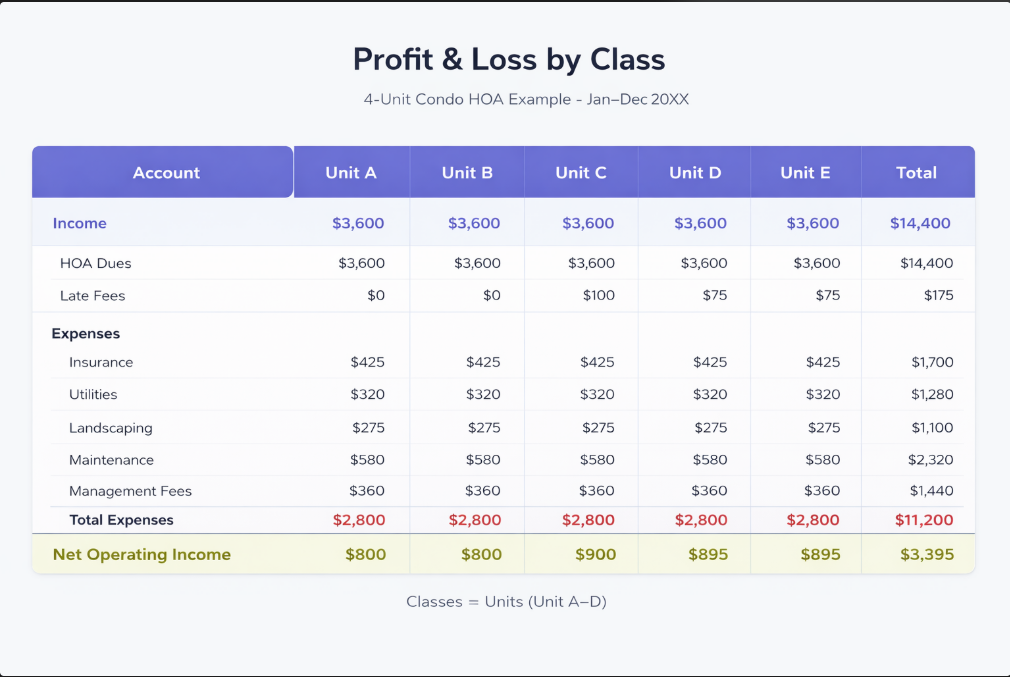
Example of Profit & Loss by Class report
Schedule Regular Reviews
Regular financial reviews are an important part of good HOA governance. Scheduling monthly or quarterly reviews allows board members to stay informed, ask questions, and address issues before they become larger problems.
During these reviews, financial reports should be presented in a consistent format, so trends, variances, and unusual activity are easy to identify. Reviewing reconciled financials helps reinforce accountability, supports informed decision-making, and builds trust among owners by demonstrating that the association’s finances are being monitored and managed responsibly.
Stay Compliant
HOAs must meet ongoing federal and state reporting requirements, making accurate recordkeeping essential. Maintaining organized financial records, vendor documentation, and consistent reporting supports compliance and simplifies year-end tax and audit processes.
Conclusion
Well-structured accounting is essential for effective HOA management. When financial systems are set up intentionally—using clear allocation methods, consistent reporting, and disciplined review processes—associations are better equipped to maintain transparency, support board decision-making, and build trust among owners.
By understanding your HOA’s financial structure and applying best practices for dues tracking, shared expense allocation, and reporting, you can create financials that are accurate, understandable, and board-ready. The goal is not complexity, but clarity—financial reports that reflect how the association actually operates and comply with its governing documents.
If your HOA is transitioning to new software, cleaning up historical records, or preparing for a new fiscal year, now is an ideal time to evaluate whether your accounting setup supports those goals. Thoughtful configuration and professional guidance can make a meaningful difference in the quality and reliability of your financial reporting.
With the right structure in place, HOA financials become a tool for oversight and confidence—rather than confusion—helping the association operate smoothly and plan responsibly for the future.

Your Personal Guide to Seamless Accounting: Advanced QuickBooks ProAdvisor at Your Service
Hey there! I’m Gina, and I’m the proud co-founder of Lend A Hand Accounting. Why did I start this? Well, I believe that everyone should have access to affordable, efficient, and flexible accounting and bookkeeping services. It’s all about making sure these essential services fit snugly into your budget without any fuss.
We’ve ditched the traditional hourly rate system and adopted a flat fee pricing. You might be wondering, “Why does this matter?” Well, this way, you know exactly what you’re paying for upfront and there are no unexpected surprises. You get to pick and choose the accounting services you need, like a customized menu. And the best part? You’re in complete control of when you start or stop using our services. We’re essentially just a call or a text away, no need for endless phone calls or draining trips to the accountant’s office.
I’m not just any accountant though. I’m an Advanced QuickBooks Online ProAdvisor. That means I’m equipped with advanced expertise and resources to help you leverage QuickBooks Online to its full potential. My goal is to make your accounting process smooth and efficient so you can focus on what you do best – running your business.
Ready to get started? Reach out to me directly at 360-637-4799. We can even kick things off immediately if you’re ready. Simply create a free account, and I can instantly take a look at your books and let you know where you stand.
At the end of the day, we’re here to serve you. We really appreciate the trust you place in us and we’re eager to meet all of your accounting and bookkeeping needs. Looking forward to being part of your team!
Take care,
Gina
The Content is for informational purposes only, you should not construe any such information or other material as legal, tax, investment, financial, or other advice.